 Frontend Frameworks
cli-table3
Pretty unicode tables for command-line interfaces.
- Status
- Generally available
- Last checked
- Checked · Oct 14, 2026
- License
- Open source
- Pricing
- Free tier · from $0
What it is
CLI-Table3 is a powerful library that allows developers to create and display formatted tables in the terminal using Unicode characters. It's particularly useful for generating readable output from scripts or applications where tabular data needs to be presented clearly.
CLI-Table3 stands out for its Unicode support and ease of integration, making it ideal for developers who need to enhance the visual presentation of data in command-line interfaces.
When it fits — and when it doesn’t
A good fit for
Developers who need to present structured data clearly and aesthetically in terminal interfaces
Projects that require rich text formatting capabilities within command-line applications
Look elsewhere if
Applications requiring real-time updates or dynamic table content
Scenarios where the output needs to be exported directly into non-terminal formats like PDF or Excel
Known weaknesses
Each one links to the public issue, changelog or docs page it came from, where we have one.
- 01
Narrow focus on JavaScript ecosystem
CLI-Table3 is tightly integrated with Node.js and may not be as useful in other environments or languages, limiting its broad applicability.
- 02
Performance issues with large datasets
Rendering large tables can lead to performance degradation due to the complexity of Unicode character handling and table formatting logic.
- 03
Small community and limited support
The project has a relatively small user base, which may result in slower response times for bug reports and feature requests.
What it does well
Unicode support for table rendering
Customizable column widths and alignments
Supports nested tables
Lightweight and easy to integrate
Pricing
- Free tier
- YesOpen source — free to use
- Paid from
- $0
- Model
- Flat rate
- Enterprise plan
- No
Pricing not independently confirmed — check the vendor’s page.
Performance benchmarks
How Fast Is It?
Set up cli-table3
Setup steps, common gotchas and what to check after 30 days.
Get the badge
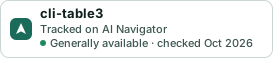
A small badge for cli-table3’s README or site: its name, “Tracked on AI Navigator”, and the availability status and check month from this page. It updates as the catalog does.
Markdown
[](https://navigateaitools.com/explorer/tool/cli-table3)HTML
<a href="https://navigateaitools.com/explorer/tool/cli-table3"><img src="https://navigateaitools.com/badge/cli-table3.svg" alt="cli-table3 — tracked on AI Navigator" height="58"></a>