 Workflow Automation
is-up
Check website availability with ease.
- Status
- UnmaintainedNo commits in 1802 days.
- Last checked
- Checked · Oct 11, 2026
- License
- Open source
- Pricing
- Free tier · from $0
What it is
is-up is a simple and effective tool to check if a website is up or down. It's useful for developers, system administrators, and anyone who needs to monitor the status of websites.
is-up stands out as a lightweight, no-frills tool for checking website status, making it ideal for quick checks and simple integration into existing projects.
When it fits — and when it doesn’t
A good fit for
Developers who need a simple and lightweight tool to check website status without complex setup.
System administrators looking for an easy way to monitor the availability of websites.
Look elsewhere if
Projects requiring advanced monitoring features like detailed uptime reports or custom alerting systems.
Teams needing real-time streaming data from monitored sites.
Known weaknesses
Each one links to the public issue, changelog or docs page it came from, where we have one.
- 01
Limited functionality for complex monitoring needs
is-up only checks if a website is up or down without providing detailed metrics such as response time, uptime percentage, or error rates.
- 02
No built-in alerting system
Users need to implement their own alerting mechanisms or integrate with third-party services for notifications when a website goes down.
- 03
Lacks comprehensive documentation and examples
The official documentation is sparse, making it difficult for new users to understand advanced usage without referring to the source code or community forums.
What it does well
Simple and lightweight
Easy to integrate into existing projects
Quickly check website status
Pricing
- Free tier
- YesOpen source — free to use
- Paid from
- $0
- Model
- Flat rate
- Enterprise plan
- No
Pricing not independently confirmed — check the vendor’s page.
Performance benchmarks
How Fast Is It?
Set up is-up
Setup steps, common gotchas and what to check after 30 days.
Get the badge
A small badge for is-up’s README or site: its name, “Tracked on AI Navigator”, and the availability status and check month from this page. It updates as the catalog does.
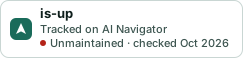
Markdown
[](https://navigateaitools.com/explorer/tool/is-up)HTML
<a href="https://navigateaitools.com/explorer/tool/is-up"><img src="https://navigateaitools.com/badge/is-up.svg" alt="is-up — tracked on AI Navigator" height="58"></a>