 Evaluation & Testing
Notion QA
Question-Answering Bot for Notion Data
- Status
- UnmaintainedNo commits in 1190 days.
- Last checked
- Checked · Oct 16, 2026
- License
- Open source
- Pricing
- Free tier · from $0
What it is
Notion QA is a tool that allows users to ask questions about their Notion data and receive answers directly from the content within their databases. It's useful for automating information retrieval and enhancing productivity.
Notion QA stands out by offering a straightforward way to query Notion data using natural language, making it an ideal tool for those looking to enhance their productivity without the need for complex setup or cloud services.
When it fits — and when it doesn’t
A good fit for
Developers looking to integrate question-answering capabilities into their Notion workflows.
Productivity enthusiasts who want to quickly retrieve information from large Notion databases.
Teams that need a self-hosted solution for maintaining data privacy.
Look elsewhere if
Users requiring real-time updates or streaming responses, as it is designed for batch processing.
Projects with limited technical expertise in setting up and managing self-hosted applications.
Known weaknesses
Each one links to the public issue, changelog or docs page it came from, where we have one.
- 01
Limited integrations with other tools and platforms
Primarily integrates with Notion, lacks native support for popular databases or analytics tools
- 02
Complex setup process for self-hosting
Requires Docker and Kubernetes knowledge to set up securely and efficiently
What it does well
Integrates with Notion databases for question-answering capabilities.
Uses natural language processing to understand and respond to queries.
Self-hosted, allowing full control over data privacy and security.
Pricing
- Free tier
- YesOpen source — free to use
- Paid from
- $0
- Model
- Flat rate
- Enterprise plan
- No
Pricing not independently confirmed — check the vendor’s page.
Performance benchmarks
How Fast Is It?
Set up Notion QA
Setup steps, common gotchas and what to check after 30 days.
Get the badge
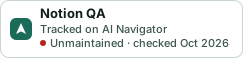
A small badge for Notion QA’s README or site: its name, “Tracked on AI Navigator”, and the availability status and check month from this page. It updates as the catalog does.
Markdown
[](https://navigateaitools.com/explorer/tool/notion-qa)HTML
<a href="https://navigateaitools.com/explorer/tool/notion-qa"><img src="https://navigateaitools.com/badge/notion-qa.svg" alt="Notion QA — tracked on AI Navigator" height="58"></a>