 Frontend Frameworks
@clack/core
Low-level primitives for building command-line applications.
- Status
- Generally available
- Last checked
- Checked · Oct 15, 2026
- License
- Open source
- Pricing
- Free tier · from $0
What it is
Clack provides essential tools and utilities to developers looking to create their own command-line interfaces. It is designed with flexibility in mind, allowing for the creation of powerful and user-friendly CLI applications.
Clack offers a lightweight and flexible approach to building CLI applications, focusing on providing essential tools without imposing unnecessary constraints.
When it fits — and when it doesn’t
A good fit for
JavaScript developers looking to build robust CLI applications
Teams needing a flexible and extensible framework for their CLI projects
Projects requiring customization of command-line interfaces without heavy dependencies
Look elsewhere if
Developers who prefer high-level abstractions over low-level primitives
Projects that require extensive built-in features not provided by Clack
Known weaknesses
Each one links to the public issue, changelog or docs page it came from, where we have one.
- 01
Steep learning curve for non-JavaScript developers
API is deeply integrated with JavaScript patterns and idioms, requiring significant time to master
- 02
Limited documentation and examples
Official documentation lacks comprehensive guides and real-world use cases, leading to confusion during implementation
- 03
Frequent breaking changes between versions
v0.1 to v0.2 migration required significant refactoring of existing codebases due to API changes
- 04
Small and less active community
GitHub issues are not promptly addressed, and pull requests take a long time to be reviewed
What it does well
Low-level primitives for CLI applications
Flexible and extensible design
Community-driven development
Pricing
- Free tier
- YesOpen source — free to use
- Paid from
- $0
- Model
- Flat rate
- Enterprise plan
- No
Pricing not independently confirmed — check the vendor’s page.
Performance benchmarks
How Fast Is It?
Set up @clack/core
Setup steps, common gotchas and what to check after 30 days.
Get the badge
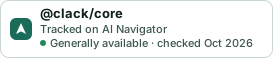
A small badge for @clack/core’s README or site: its name, “Tracked on AI Navigator”, and the availability status and check month from this page. It updates as the catalog does.
Markdown
[](https://navigateaitools.com/explorer/tool/clack-core)HTML
<a href="https://navigateaitools.com/explorer/tool/clack-core"><img src="https://navigateaitools.com/badge/clack-core.svg" alt="@clack/core — tracked on AI Navigator" height="58"></a>