 Frontend Frameworks
pyfiglet
A Python implementation of figlet for ASCII art text generation.
- Status
- Generally available
- Last checked
- Checked · Oct 10, 2026
- License
- Open source
- Pricing
- Free tier · from $0
What it is
Pyfiglet is a Python library that generates large ASCII art text from fonts. It's useful for creating visually appealing headers or titles in console applications and documentation.
Pyfiglet stands out by offering a straightforward and customizable way to generate ASCII text in Python, making it ideal for adding visual elements to console applications without the need for complex graphical libraries.
When it fits — and when it doesn’t
A good fit for
Developers who need to add visual flair to their console applications with ASCII text.
Projects that require customization of font styles in terminal outputs.
Look elsewhere if
Applications requiring real-time rendering or complex graphical elements beyond simple ASCII art.
Scenarios where high-performance is critical, as ASCII generation can be resource-intensive for large texts.
Known weaknesses
Each one links to the public issue, changelog or docs page it came from, where we have one.
- 01
Limited font variety compared to other ASCII art generators
pyfiglet's default font set is relatively small, limiting customization options.
- 02
Performance issues with large text inputs
Generating large blocks of ASCII art can be slow and resource-intensive.
- 03
Poor documentation for advanced features
The official documentation lacks detailed explanations for more complex use cases, making it difficult to fully leverage the library’s capabilities.
What it does well
Generates large ASCII art text from fonts.
Supports various font styles for customization.
Can be easily integrated into Python scripts and applications.
Pricing
- Free tier
- YesOpen source — free to use
- Paid from
- $0
- Model
- Flat rate
- Enterprise plan
- No
Pricing not independently confirmed — check the vendor’s page.
Performance benchmarks
How Fast Is It?
Set up pyfiglet
Setup steps, common gotchas and what to check after 30 days.
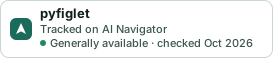
Get the badge
A small badge for pyfiglet’s README or site: its name, “Tracked on AI Navigator”, and the availability status and check month from this page. It updates as the catalog does.
Markdown
[](https://navigateaitools.com/explorer/tool/pyfiglet)HTML
<a href="https://navigateaitools.com/explorer/tool/pyfiglet"><img src="https://navigateaitools.com/badge/pyfiglet.svg" alt="pyfiglet — tracked on AI Navigator" height="58"></a>